Windows 10/11 · 64-bit · everything stays on your PC

Scan a whole album page,
AlbumPeel cuts every photo.

It finds only the photos on the page, straightens tilt and perspective, and saves each one neatly. Your original scan stays untouched, and so do the size and dpi.
Download the trialSee features

10-day trial · 3 saved pages free  |  Full license: 1,000 pages for 29.5 USD

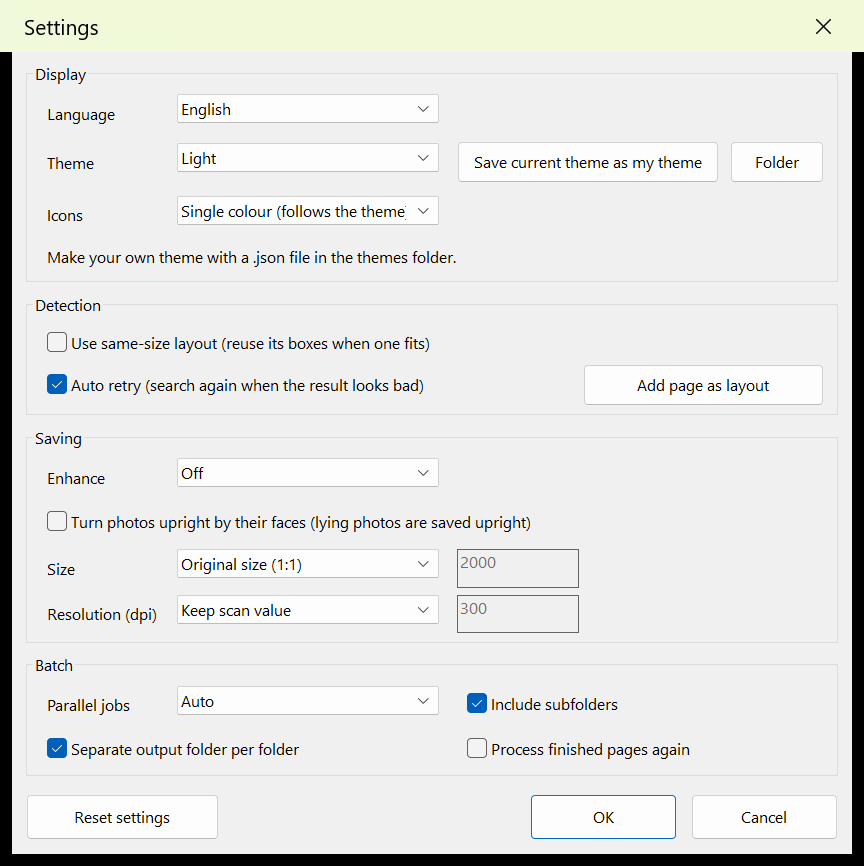
AlbumPeel main window: a box on every photo of the scanned page and the cut photos on the right
1 → None scan, many photos
1:1original size · dpi kept
0 byteno photo ever leaves your PC
5 languages한국어 · English · 中文 · 日本語 · Español

FeaturesSorting scans gets this easy

Several detection methods find only the photo areas and retry by themselves when a result looks wrong. Drag a box to fix it on the spot.


✂️

Cuts only the photos

Several detection algorithms find the photo areas; tilt and perspective are straightened.

🙂

Turns upright by faces

Photos lying on their side are stood up by the direction of the faces (optional; no face, no change).

✨

Optional enhancement

Brings back faded colour and contrast and reduces dust marks. Off / auto / always.

📚

Whole folders in batch

Dozens to hundreds of pages at once, in parallel. Doubtful pages are marked "review" and a CSV report is written.

🎚️

Size and dpi your way

Default is original 1:1 and the scan dpi. Reduce by long side px or %, and set the dpi if you like.

🔒

On your PC, offline

Neither photos nor data are sent anywhere. Activation needs no internet either.

Before & AfterOne scan → many photos

Six photos found on one scanned page and straightened into single files.


Sample scan page with six photos
One scan (photos lie at an angle)
Result 1Result 2Result 3 Result 4Result 5Result 6
Result: one PNG · JPG · TIF per photo (name_01, name_02 …)

Sample images are made-up pictures for explanation. Real results depend on the scan.

How it worksThree steps

Open your scans

Open scan files (JPG · PNG · TIF · BMP) or a whole folder.

Find photos

One click draws a box on every photo. Drag the corners to fix a box.

Save

Pick a format and each photo is saved. Many pages: use Batch.

Settings & ThemesPreferences, your way

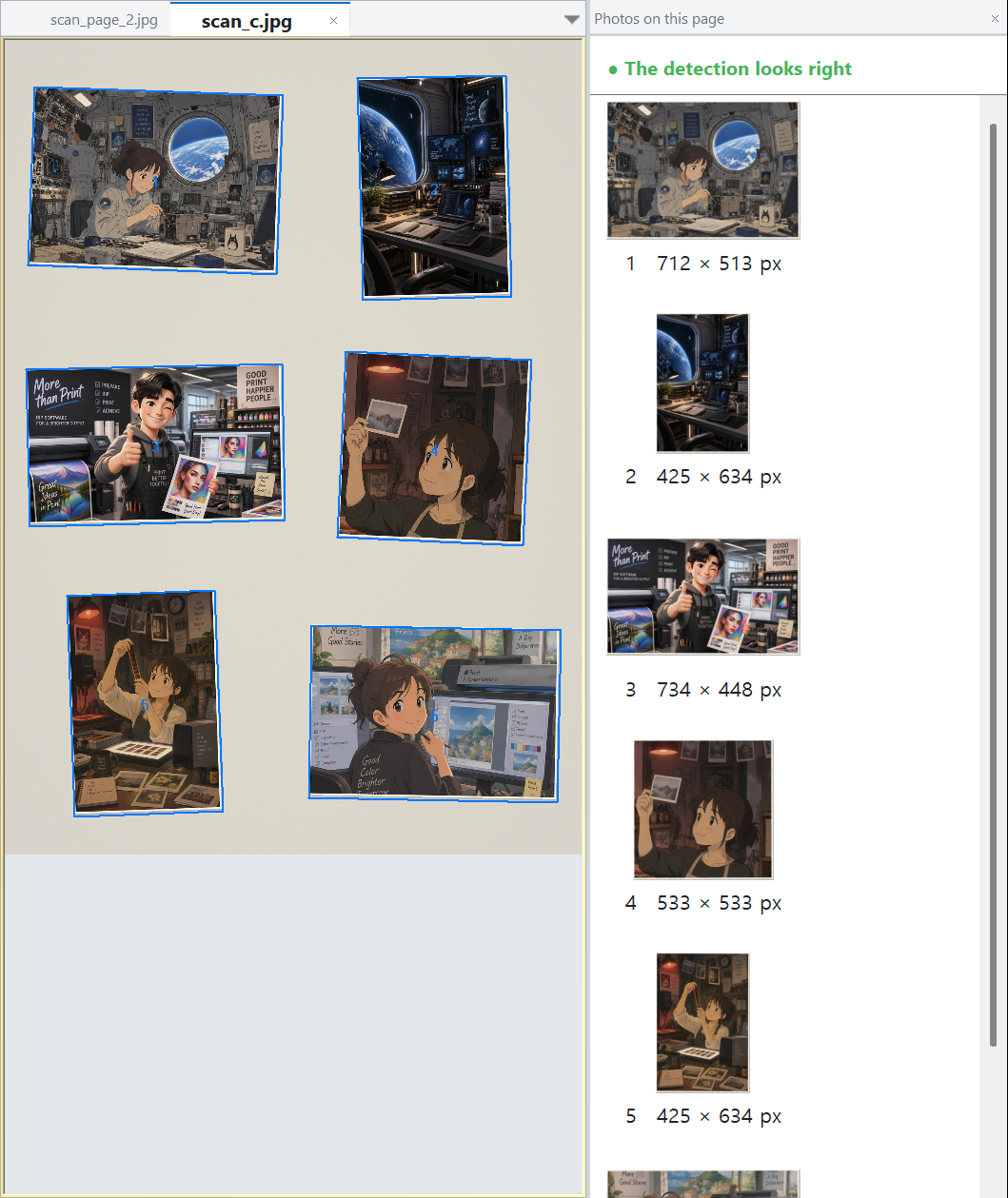
Language, light or dark theme, icon style. Save the current theme to a file and edit its colours to make your own theme.

  • Detection: automatic retry, same-size layout
  • Saving: enhancement, face rotation, size and resolution (dpi)
  • Batch: parallel pages, subfolders, folder per scan
Preferences window: display, detection, saving, batch

Install & UseInstall and use at a glance

  • Requirements: Windows 10/11 64-bit only, about 100 MB installed, scans of 300 dpi or more recommended, input JPG · PNG · TIF · BMP.
  • Install: the installer asks for administrator rights (normal). Close the program before installing a new version; your settings and license record are kept.
  • Windows warning: the installer is not code-signed yet, so SmartScreen may warn. If you know where the file came from, choose More info → Run anyway.
  • Use: 1) open a scan 2) find photos 3) save. Drag corners to fix a box, draw a box in an empty area for a missed photo. Many pages: use Batch.
  • Your original scan is never changed. Box corrections are kept in a small file next to the scan.

Detailed install & user guide

AlbumPeel ribbon: open, detect and save, edit, view, panels, settings, license

DownloadDownload

FileAlbumPeel_Setup_1.0.0.1.exe (about 46 MB) · version 1.0.0.1
LinkAlbumPeel_Setup_1.0.0.1.exe (GitHub Releases) · all versions
SHA-256cfd578cabf9264ce52ac80333d93628b6d971b8752289faff9c7a29494a3a241
LicenseTrial (10 days, 3 saved pages) → full 1,000-page license, 29.5 USD

Download the trialHow to buy and activate

Some antivirus programs may flag the protected executable by mistake. Allow it or add an exception; contact us if it continues.

PricingTry it first, then decide

Trial

Free
  • 10 days after installation
  • Finding, editing and previewing unlimited
  • Saving up to 3 pages
Download

Full license

29.5 USD
  • 1,000 pages of saving (saving the same scan again costs nothing)
  • No time limit · one PC
  • Paid by PayPal · activation code by e-mail
How to buy

The license is for one PC and the PC cannot be changed (one recovery per license if the PC fails). Details: Policy & License and Terms.

FAQFrequently asked questions

A photo was not found. What now?

Drag in an empty area to draw a box and fit its four corners to the photo. If it happens often, leave a little more gap between photos when scanning.

Does it change my original scan?

No. Scan files are only read.

Do I need the internet?

Not for using it and not for activation.

What if I change my PC?

The license is for one PC and the PC cannot be changed. Only if the PC has failed, one recovery per license is possible. Details: Purchase & License.

Where do I ask questions?

E-mail albumpeel@gmail.com (include the PC code for an activation request). Announcements and news are on News; questions are on Q&A.

BlogStories about album scanning

News

More on the blog

Check it on your own album

10 days, 3 saved pages free. No credit card needed.

Download the trialInstall & User Guide